Simulation Lab
The pages so far derive reconnection with pencil and paper. Here you run it. The Simulation Lab is a small resistive-MHD code, splmhd, that solves the equations derived in Resistive MHD: deriving the equations on a grid, in Cartesian or spherical coordinates, in 2D or 3D.
The code is written in plain Python and NumPy so that you can read every line. These pages explain how the equations become code; your laptop does the computing.
How it works
- Download the code (once): one zip file with the solver, example runs and plotting tools.
- Double-click Start Lab in the unzipped folder. The first time, it installs numpy and matplotlib for itself.
- Pick a run from the menu, or a config file you made with the parameter builders on the Cartesian and Spherical pages.
- Watch it live: one window shows each stage of the algorithm, the energy budget, the reconnection rate and the checks; four more show the magnetic field, the current, the flow and the plasma as the run goes. At the end the plots and a movie are made for you; 3D runs can open ParaView.
New to running code? Run it on your computer walks through every step: where the download goes, how to unzip it, where to keep the folder, how to start the lab and what you will see.
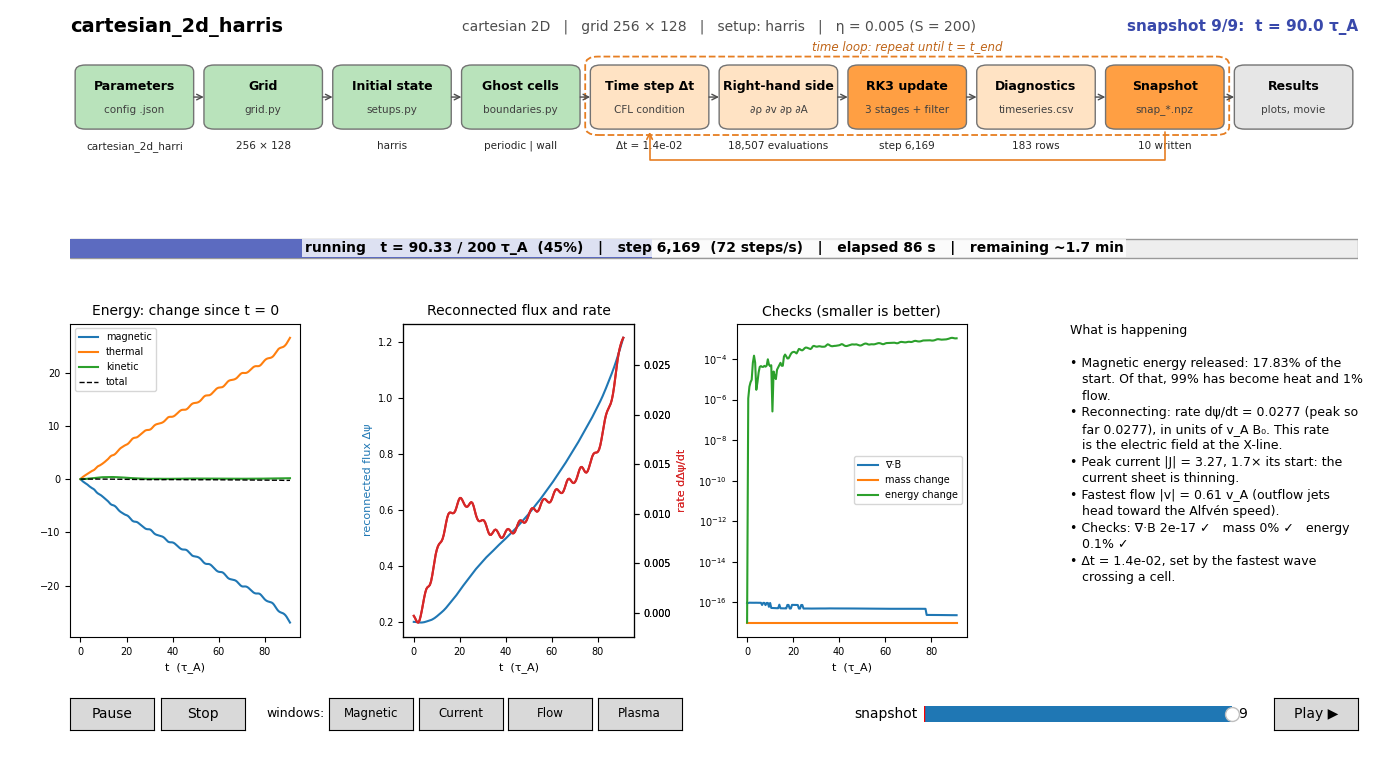
What the code does, in one picture
The config file sets up the grid, the initial state and the boundaries once. Then the time loop advances four equations again and again, writing diagnostics and snapshots on the way. Click a box to read how that step works. The Cartesian and Spherical pages show the chart for their 2D and 3D runs.
What the code solves
In code units (\(\mu_0 = 1\), lengths in \(L_0\), speeds in \(v_A\), times in \(\tau_A = L_0/v_A\); see dimensionless form), for density \(\rho\), velocity \(\mathbf{v}\), pressure \(p\) and vector potential \(\mathbf{A}\):
with \(\mathbf{B} = \nabla\times\mathbf{A}\) (plus an optional uniform background field), \(\mathbf{J} = \nabla\times\mathbf{B}\) and vorticity \(\boldsymbol{\omega} = \nabla\times\mathbf{v}\). Discretizing the equations explains why they are written in this particular form.
What is in the zip file
| File | Concept | Explained in |
|---|---|---|
splmhd/grid.py |
Cell-centred mesh, ghost cells, scale factors | Grid |
splmhd/operators.py |
grad, div, curl by central differences | Derivatives |
splmhd/physics.py |
Right-hand side of the equations | Right-hand side |
splmhd/boundaries.py |
Periodic, wall, fixed, open boundaries | Boundaries |
splmhd/solver.py |
RK3 time stepping, CFL, diagnostics, output | Time stepping |
splmhd/setups.py |
Initial conditions | Cartesian, Spherical |
Start Lab.command, Start Lab.bat |
Double-click to start (Mac, Windows) | Run it |
lab.py |
The lab: menu, parameter changes, live window, plots at the end | Run it |
run.py |
The solver's command line (the lab calls it) | Visualizing |
tools/ |
Live monitor, plots, movies, 3D viewer, ParaView | Visualizing |
configs/ |
Seven ready-made runs | the pages below |
The example runs
| Config | Physics | Run time* |
|---|---|---|
cartesian_2d_alfven |
Alfvén wave: a test against an exact solution | seconds |
cartesian_2d_harris |
Sweet–Parker reconnection of a Harris sheet | ~4 min |
cartesian_3d_harris |
An X-line born in a patch that spreads along the current | ~15 min |
spherical_2d_dipole |
A magnetosphere: driven reconnection at a dipole's null ring | ~2 min |
spherical_3d_dipole |
The same in 3D, pushed on one patch of longitude | ~10 min |
spherical_2d_sheet, spherical_3d_sheet |
Advanced: a current sheet in a gravitating corona | ~5 / 15 min |
*Measured on an Apple M3 laptop; expect 2–3 times longer on an older machine.
What this code is, and is not
splmhd is built for learning: second-order central differences, explicit time stepping, NumPy arrays, about 700 lines for the solver. It is accurate for smooth resistive flows like the ones here and checks itself (energy, mass, \(\nabla\cdot\mathbf{B}\)). It is not a shock-capturing research code and is about 100 times slower than compiled codes. When you need those, the same ideas carry over to community codes such as Athena++, PLUTO and the Pencil Code.