Visualizing the results
A run writes numbers; understanding comes from pictures. The tools/ folder in the
download turns snapshots into pictures of every field, field lines and flows, movies, and
3D views. All of them run from the splmhd folder and save their output in output/<run>/plots/.
| Tool | What it makes | Needs |
|---|---|---|
monitor.py |
The live monitor: a run window (stages, energy, rate, checks) and windows for B, J, v and ρ, p, T | numpy, matplotlib |
paraview_live.py |
Opens ParaView with a ready 3D scene, also while a run is going | ParaView |
plot_fields.py |
A 3×3 overview, or single fields, for one or all snapshots | numpy, matplotlib |
plot_timeseries.py |
Energy budget, reconnected flux and rate, numerical checks | numpy, matplotlib |
make_movie.py |
Animated GIF of one field through time | numpy, matplotlib |
view3d.py |
Interactive 3D page: field lines, \(\mathbf{B}\) and \(\mathbf{v}\) arrows, the current sheet, slices | plotly |
show_initial.py |
The initial state of a config, before you run it (in the lab: type show) |
numpy, matplotlib |
export_vtk.py |
VTK files for ParaView or VisIt | numpy |
You do not have to type any of these. The lab (Start Lab, see Run it on your computer)
opens the live monitor while a run goes and makes the overview, the energy plot, the movie and, for 3D runs, the
interactive page when it ends. The commands below are for when you want a particular picture, or want to know how it is made.
The live monitor
python3 tools/monitor.py output/cartesian_2d_harris          # follow a run that is going, or replay a finished one
python3 tools/monitor.py output/cartesian_2d_harris --save   # just save the five windows as pictures in plots/
Five windows: Run (algorithm stages, progress, energy, reconnection rate, checks, a plain-language reading and the buttons), Magnetic field (\(B_1, B_2, B_3, \lvert\mathbf{B}\rvert\)), Current (\(J_1, J_2, J_3\); in 3D also a 3D view), Flow (\(v_1, v_2, v_3\) and \(\lvert\mathbf{v}\rvert\) with arrows) and Plasma (\(\rho, p, T\)). Components 1, 2, 3 are \(x, y, z\) or \(r, \theta, \phi\). In 2D every panel carries field lines.
The monitor only reads files: the status.json that the solver rewrites once a second (stage, time, step, time step,
speed), timeseries.csv and the snapshots. So it can be opened, closed and reopened at any time without disturbing the
run, and it can replay any finished run. Its Pause and Stop buttons write the word pause or stop into
control.txt in the run folder; the solver checks that file once a second. What each window shows is
explained here.
Field names
Every tool uses the same names:
| Name | Field | Name | Field |
|---|---|---|---|
rho |
density \(\rho\) | vmag, v1, v2, v3 |
flow speed and velocity components |
p |
pressure \(p\) | Bmag, B1, B2, B3 |
field strength and components |
T |
temperature \(p/\rho\) | Jmag, J1, J2, J3 |
current density |
beta |
plasma beta \(2p/B^2\) | E1, E2, E3 |
electric field \(-\mathbf{v}\times\mathbf{B} + \eta\mathbf{J}\) |
eta |
resistivity |
Components 1, 2, 3 are \(x, y, z\) in Cartesian runs and \(r, \theta, \phi\) in spherical runs. For reconnection the most
telling fields are J3 (the current sheet), E3 (the reconnection electric field), v1 (the outflow jets) and
T (where the energy goes).
Overview of a snapshot
python tools/plot_fields.py output/cartesian_2d_harris              # last snapshot
python tools/plot_fields.py output/cartesian_2d_harris --snap 10    # snapshot 10
python tools/plot_fields.py output/cartesian_2d_harris --all        # every snapshot
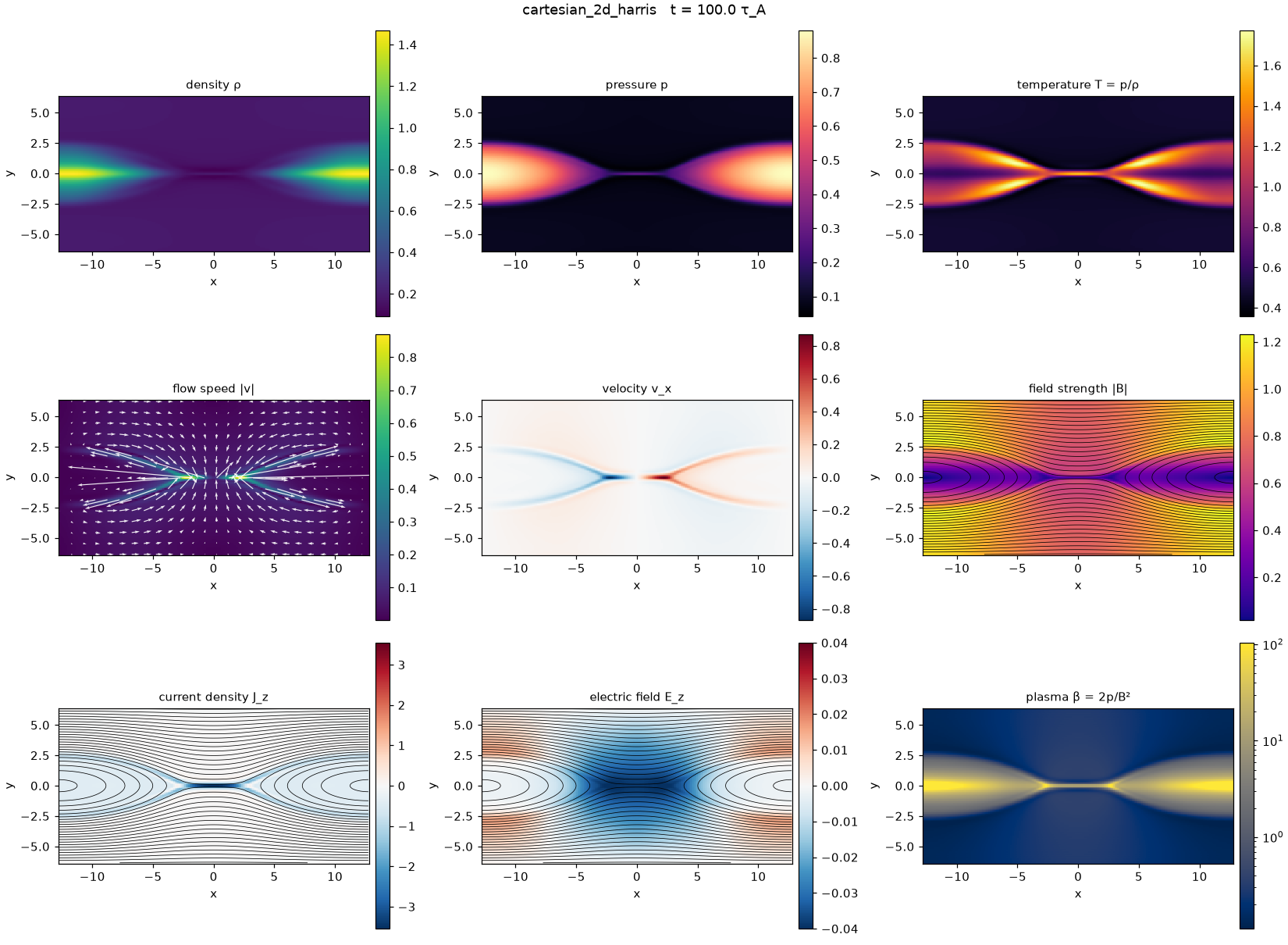
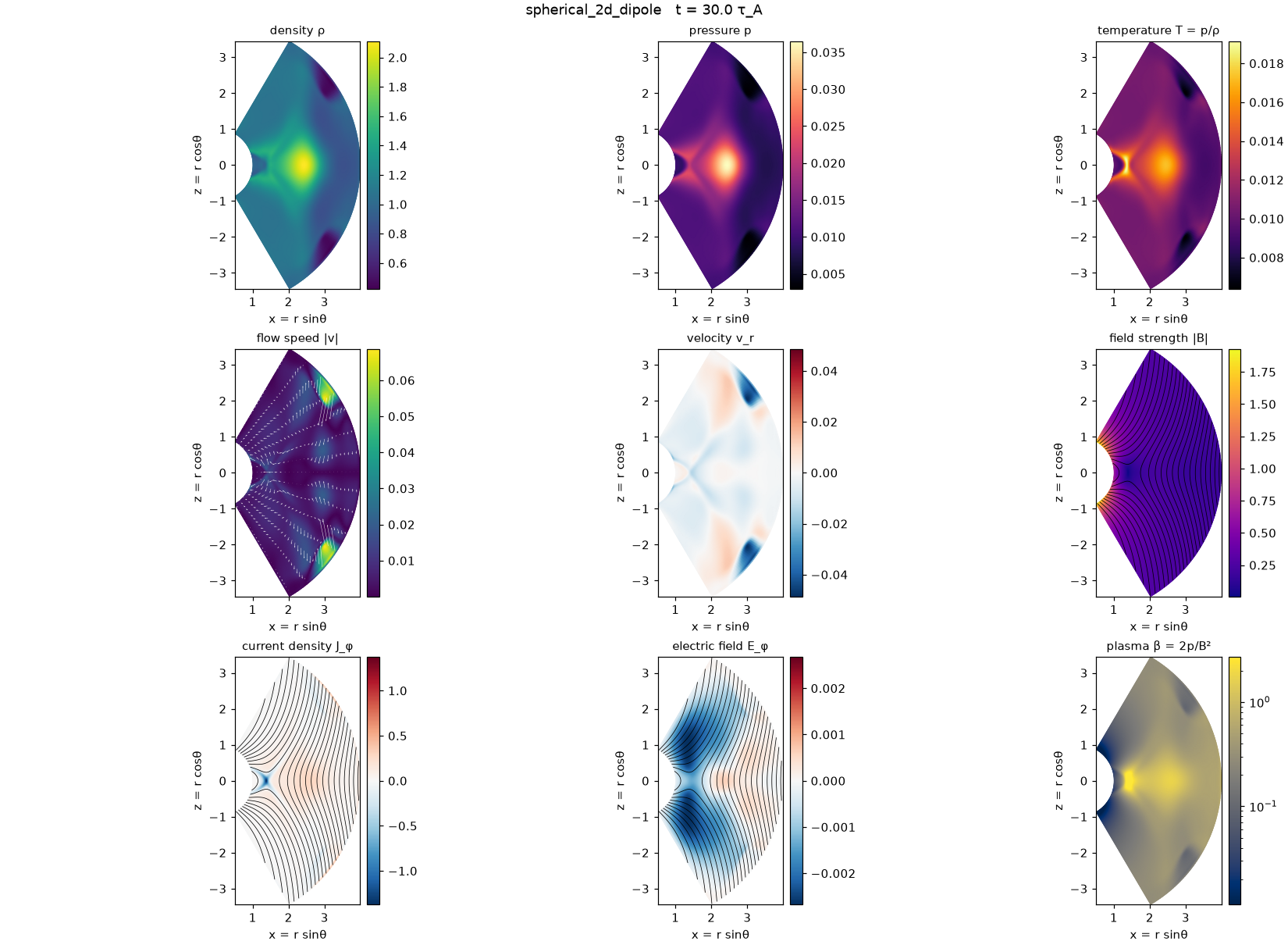
Black lines are magnetic field lines. In 2D they are contours of the flux function, \(A_z\) in Cartesian runs and \(r\sin\theta A_\phi\) in spherical ones; contours are field lines because \(\mathbf{B}\cdot\nabla\psi = 0\) (The flux function ψ). White arrows are the flow in the plane.
Spherical runs are drawn in the meridional plane, \(x = r\sin\theta\), \(z = r\cos\theta\), so they look like the real geometry:
Single fields
python tools/plot_fields.py output/cartesian_2d_harris --fields J3,E3,v1,T --snap 10
Each field is saved as its own picture, larger and with a full title.
3D runs: slices
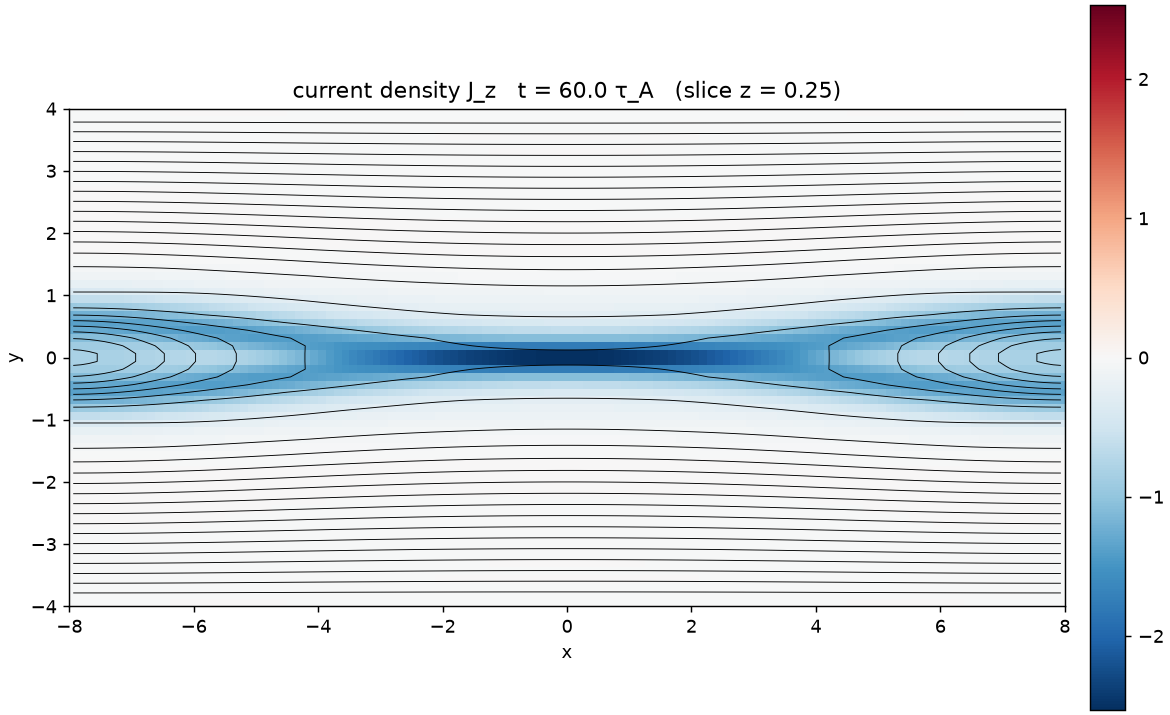
A 3D snapshot is cut by a plane. The default cut is normal to \(x_3\) (\(z\), or \(\phi\) in spherical runs) through the middle.
Choose another with --normal (0, 1 or 2) and --index (the cell number along that direction):
python tools/plot_fields.py output/cartesian_3d_harris --normal 1 --fields J3,v1   # the x-z plane through the sheet
python tools/plot_fields.py output/cartesian_3d_harris --normal 2 --index 4      # an x-y plane near the edge
The energy budget and checks
python tools/plot_timeseries.py output/cartesian_2d_harris
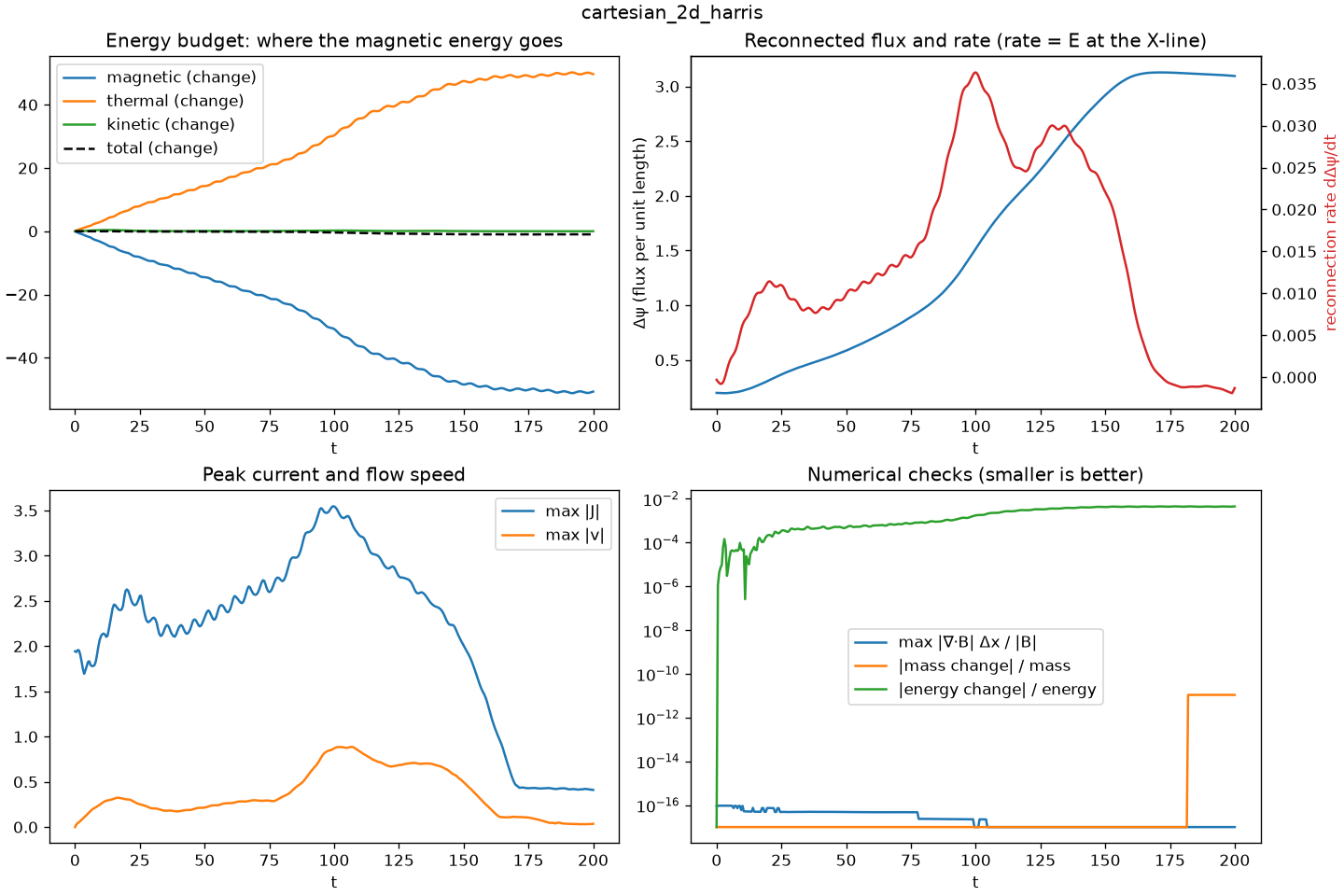
- Energy budget. Changes of magnetic, thermal and kinetic energy. Reconnection shows up as magnetic energy turning into heat and flow.
- Reconnected flux and rate. The rate is the electric field at the X-line (why).
- Peak current and speed. Current sheets thinning, jets accelerating.
- Numerical checks. \(\nabla\cdot\mathbf{B}\) (should be about \(10^{-16}\)), and the relative change of mass and energy. If these grow suddenly, suspect the numerics before the physics.
Movies
python tools/make_movie.py output/cartesian_2d_harris --field J3
python tools/make_movie.py output/spherical_2d_dipole --field vmag --fps 6
This writes an animated GIF that any browser or slide program can show. More snapshots (a smaller dt_output in the
config) make a smoother movie.
Interactive 3D in the browser
pip install plotly          # once
python tools/view3d.py output/cartesian_3d_harris --field Jmag --lines 30
This writes an HTML page that you can rotate and zoom. Click a name in its legend to show or hide that part:
- magnetic field lines, coloured by where they go: blue on one side of the sheet (or the equator), red on the other, and green where a line crosses it. For a current sheet the green lines are the reconnected ones, so their number grows during the run;
- arrows of the direction of \(\mathbf{B}\) on a coarse lattice (hover over one for \(|\mathbf{B}|\)), and arrows of the flow (off at first);
- the current sheet, where \(|\mathbf{J}|\) is strong;
- three see-through slices of the chosen field (
--field, default \(|\mathbf{J}|\)). In spherical runs \(\mathbf{B}\) and \(\mathbf{J}\) fall off steeply with \(r\), so the slices show the field times \((r/r_{in})^p\), with \(p\) fitted to that fall-off: every variation along the sheet stays visible (--absoluteshows the raw values).
In the live monitor of a 3D run, the magnetic window has the same picture as a 3D panel you can rotate with the mouse, and white arrows of the direction of \(\mathbf{B}\) on the \(|\mathbf{B}|\) slice.
How the field lines are traced
A field line is a curve everywhere tangent to \(\mathbf{B}\): \(d\mathbf{x}/ds = \mathbf{B}/|\mathbf{B}|\), with \(s\) the arc length.
In curvilinear coordinates each component is divided by its scale factor, \(dx_i/ds = B_i/(h_i|\mathbf{B}|)\).
view3d.py integrates this with a second-order Runge–Kutta step, interpolating \(\mathbf{B}\) trilinearly between cells,
in both directions from each seed point, until the line leaves the box. The same idea with \(\mathbf{v}\) in place of
\(\mathbf{B}\) gives streamlines of the flow.
ParaView for 3D
ParaView is a free, professional 3D visualization program. The quickest way in:
python3 tools/paraview_live.py output/cartesian_3d_harris
converts the snapshots, writes a scene script output/.../vtk/paraview_scene.py and starts ParaView with it: a slice
coloured by \(\lvert\mathbf{J}\rvert\), an isosurface of the current sheet and field lines through it. The lab does this
by itself, beside the live monitor, when you answer yes to ParaView for a 3D run. While a run is going, new snapshots
appear after File → Reload Files → Find new files.
To build the scene yourself, convert snapshots to VTK first:
python tools/export_vtk.py output/cartesian_3d_harris # all snapshots -> output/.../vtk/
Then in ParaView:
- File → Open the
snap_..vtkfiles (they load as a time series) and press Apply. - Colour by
Jmag. Add Filters → Contour onJmagfor an isosurface of the current sheet. - Add Filters → Stream Tracer with vectors
Bfor magnetic field lines (orvfor flow lines). Choose the Point Cloud seed type and place the seeds at the X-line. - Add Filters → Slice to cut through the sheet; play the time series with the ▶ button.
Spherical runs are exported with Cartesian \((x, y, z)\) points and Cartesian vector components, so everything above works for them too.
Your own analysis in Python
Every snapshot is a NumPy .npz file. Arrays have shape (n1, n2, n3), vectors (3, n1, n2, n3):
import sys
sys.path.insert(0, ".")                      # run from the splmhd folder
import matplotlib.pyplot as plt
from splmhd.io import load_snapshot

d = load_snapshot("output/cartesian_2d_harris/snap_0010.npz")
x, y = d["x1"], d["x2"]
Bx = d["B"][0][len(x) // 2, :, 0]            # B_x along y, through the X-line (x = 0)
plt.plot(y, Bx)
plt.xlabel("y"); plt.ylabel("B_x"); plt.title(f"t = {d['t']:.0f}")
plt.show()
d["config"] holds the run's parameters, and splmhd.io.load_timeseries(run_dir) returns the diagnostics as a
dictionary of columns.
Practice problems
Try each problem before opening its solution. Click an option to check a concept question.
Problem 1
Which field shows best where reconnection is happening right now?
- The density \(\rho\)
- The out-of-plane electric field \(E_z\) (or \(E_\phi\)) near the X-line
- The magnetic field strength \(|\mathbf{B}|\)
- The temperature
The out-of-plane electric field at the X-line is the rate at which flux is reconnected. Density and temperature record what has already happened, and \(|\mathbf{B}|\) is small at the X-line whether or not it is active.
Problem 2
Why are contours of \(A_z\) magnetic field lines in a 2D Cartesian run?
- Because \(\mathbf{B}\cdot\nabla A_z = 0\): the field runs along the contours
- Because \(A_z\) is proportional to \(|\mathbf{B}|\)
- Because \(A_z\) is the electric potential
- They are only approximately field lines
With \(B_x = \partial_yA_z\) and \(B_y = -\partial_xA_z\), \(\mathbf{B}\cdot\nabla A_z = \partial_yA_z\partial_xA_z - \partial_xA_z\partial_yA_z = 0\). In 2D they are exact; in a 3D slice they are not, which is why the 3D tools trace field lines instead.
Problem 3
In timeseries.png, \(\nabla\cdot\mathbf{B}\) jumps from \(10^{-16}\) to \(10^{-3}\) halfway through a run. What is the most likely explanation?
- Reconnection creates magnetic monopoles
- The plotting tool has a bug
- Something has gone wrong numerically, for example the run is going unstable near a boundary
- It is normal for \(\nabla\cdot\mathbf{B}\) to grow with time
With \(\mathbf{B} = \nabla\times\mathbf{A}\) the discrete divergence is zero to round-off in every physical cell. A large value means NaNs or extreme values are appearing, typically the first sign of an instability.